


How to add a CAA record on IONOS (formerly 1and1)
Step-by-step instructions for adding a CAA record on IONOS
A CAA record is a DNS record that says which certificate authorities may issue SSL certificates for your domain. Authorities are required to check it before they issue, but you are not required to have one. It is still worth the five minutes: it is cheap insurance against somebody obtaining a certificate for your domain by mistake.
IONOS is what 1and1 has been called since 2019. If your account still says 1&1, it is the same one.
How to add a CAA record on IONOS
- Sign in to your IONOS account and go to Domains & SSL.
- Next to the domain you want to protect, open the gear menu and choose DNS.
- Click ADD RECORD and choose CAA.
- Fill in the fields:
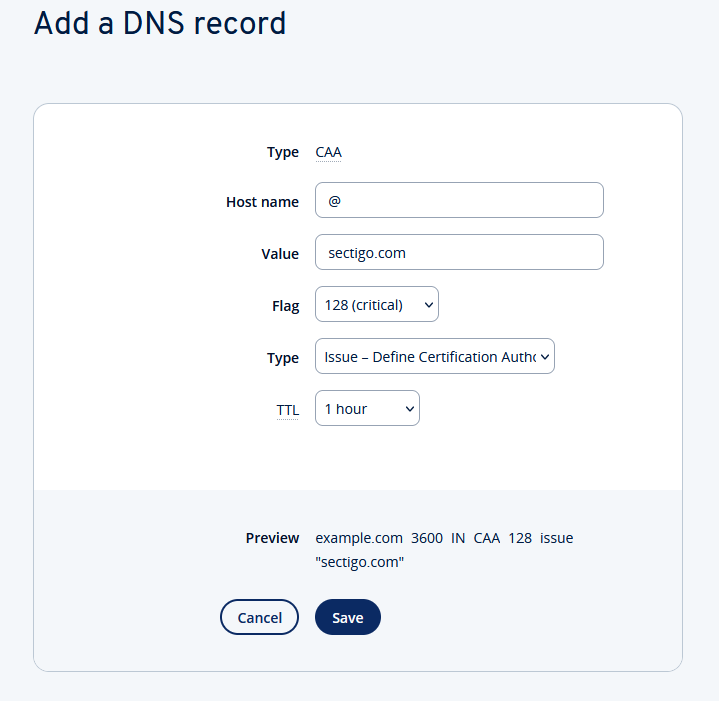
- Host name: enter
@for your domain. The@acts as a wildcard and covers the domain with www and all of its subdomains. - Value: the domain of the certificate authority you are authorising. The authority itself will tell you what to use —
digicert.comorsectigo.com, for instance. - Flag: choose
0or128. With0 (not critical), an authority ignores any entry in the record it cannot interpret. With128 (critical), if it cannot interpret an entry it will not issue the certificate. - Type: choose
Issueto authorise ordinary certificates. - TTL: optional. The default is fine.
- Click Save. The change takes effect immediately.
Authorising wildcard certificates
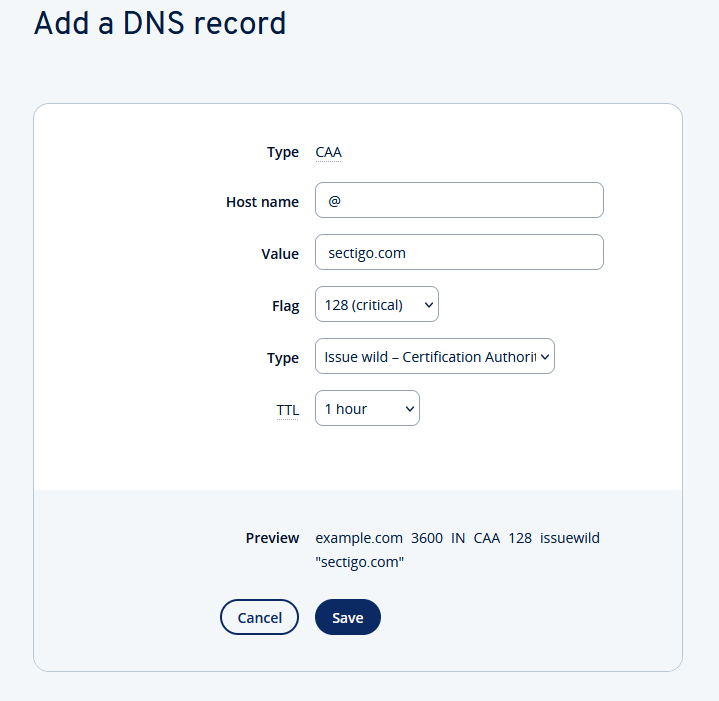
An Issue record is not enough for a wildcard certificate. If you are protecting *.yourdomain.com, add a second CAA record that is identical except for Type, which should be Issuewild.
Preventing any certificate at all
If a domain should have no certificates whatsoever, you can say so: a CAA record with an empty Value — or a ; — tells every authority that none of them is authorised. Useful for domains you only use for email, or that you hold without a website on them.


