


How to generate a CSR for Amazon EC2 (AWS)
For more on CSRs and why your private key matters, see our Certificate Signing Request (CSR) overview. If you have already generated the CSR, received your trusted SSL certificate and need help installing it, see our Amazon EC2 SSL installation instructions.
To create a CSR on your Amazon EC2 server you will use OpenSSL commands inside your EC2 instance.
1. Connect to your EC2 instance
For how to connect to your instance, see Amazon's guide here.
Once connected, go to your server's private key store at /etc/pki/tls/private/.
2. Generate a new private key
To create a new 2048-bit RSA private key, run:
[ec2-user ~]$ sudo openssl genrsa -out custom.key3. Create the CSR from the key
Once the private key exists, run this to create the CSR:
[ec2-user ~]$ sudo openssl req -new -key custom.key -out csr.pemOpenSSL will then prompt you to fill in the certificate request. These fields are required:
- Country: the two-letter ISO abbreviation for your country.
- State/Province: the state, province or region within your country where your organisation is located. Do not abbreviate.
- Locality: the city or town you are in.
- Organisation Name: the full legal name of your organisation. (For certificates that are not organisation-validated you can put anything relevant here, such as your domain name or N/A.)
- Common Name: the domain name or public IP address the SSL certificate will protect, that is, www.domain.com. For a single-domain wildcard certificate the domain has to be in the format *.domain.com.
The organisational unit and email address fields are not usually required in your CSR.
CSR challenge phrase
OpenSSL may ask you to set a challenge phrase or password on the CSR. We suggest not setting one.
4. Check the CSR output
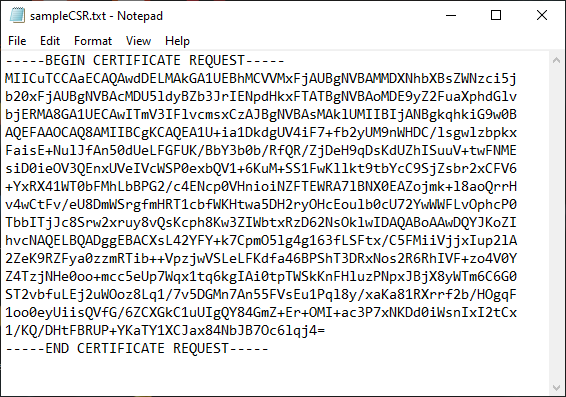
The CSR is written out as a .pem file, which opens in any plain text editor such as Notepad. Open it and copy the whole block, including the -----BEGIN CERTIFICATE REQUEST----- header and the -----END CERTIFICATE REQUEST----- footer, into your SSL order generation form.
5. Validation and installation
Once you have your CSR and have enrolled your order, your certificate enters validation with the issuing certificate authority, which will ask whoever requested the certificate to complete some form of validation. For the different levels of validation and how to satisfy the industry requirements, see our validation articles.
After validation is complete and the certificate authority has issued your trusted SSL certificate, carry on with our Amazon EC2 (AWS) SSL installation instructions.


